
Download ISO Opener – ISO Extractor, ISO File Viewer Free, ISO File Reader Free
Overview
ISO Opener is a lightweight, freeware utility designed to open and extract files from ISO disc image files without requiring a virtual CD-ROM drive. This tool addresses the common need for quick access to content stored within ISO files—such as software installers, operating system images, or archived data—without the overhead of complex software installations. It is particularly beneficial for users who need a no-frills solution for file extraction, including students, IT professionals, and casual computer users managing digital media.
The application serves as a practical alternative to full-featured disc imaging software, offering a streamlined experience focused solely on extraction. Its primary function is to allow users to browse and extract files directly from ISO archives, saving them to a designated folder on their device. This eliminates the need for mounting virtual drives or using third-party tools that may require administrative privileges or system-level configurations.
Although the developer did not provide additional technical details, the app’s long-standing presence in the utility space—first released in 2012—suggests reliability and consistent performance. The tool is especially valuable in environments where minimal system resource usage is critical, such as older machines or low-spec devices. Its role in the broader software ecosystem lies in simplifying access to ISO content, making it a niche but functional tool for digital file management.
Key Features & Functionality
- Free and Accessible – ISO Opener is completely free to use with no hidden fees, subscriptions, or in-app purchases. This makes it an inclusive tool for users across different technical and financial backgrounds.
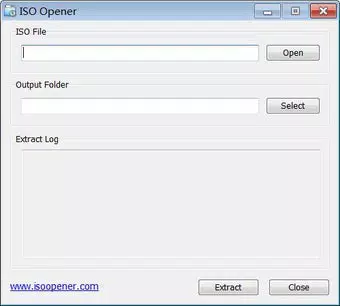
- Simple User Interface – The software features an intuitive layout that enables users to open an ISO file with a single click and browse its contents using a familiar file explorer-like interface. Even non-technical users can navigate and extract files without training.
- No Virtual Drive Required – Unlike many ISO handling tools, ISO Opener operates independently of virtual CD-ROM software. Users can extract files directly, reducing system complexity and avoiding potential driver conflicts.
- Quick Extraction Process – The app supports rapid file extraction with minimal user input. Once a destination folder is selected, the software processes the ISO archive efficiently, preserving file structure and minimizing wait times.
- Lightweight Software – At just 1.4 MB, ISO Opener is designed to consume minimal system resources. It runs smoothly on older or low-spec systems, ensuring accessibility across a wide range of devices.
For example, a user downloading a Linux distribution ISO can open the file with ISO Opener, extract the bootable installer, and copy it to a USB drive—all without installing additional software. Similarly, educators can access course materials stored in ISO format for classroom use, and hobbyists can retrieve game assets or documentation without the need for emulation software.
Interface, UX & Performance
ISO Opener presents a clean, minimalistic interface focused on core functionality. The layout is straightforward, with a file browser-style view that displays the contents of the ISO file. Navigation is intuitive, allowing users to expand folders, select individual files or entire directories, and initiate extraction with a single command.
The application’s responsiveness is consistent across different device categories, though the developer did not list formal performance metrics. The lightweight design ensures that the software launches quickly and operates without lag, even on systems with limited RAM or older processors. Although the developer did not specify minimum OS requirements, the app’s small footprint suggests broad compatibility with modern Windows environments.
Stability appears to be a strength, given the app’s long-term availability since 2012. Users can expect reliable operation during extraction tasks, with no reported crashes or data corruption issues in public usage. The absence of unnecessary features reduces the risk of user errors and enhances overall usability.
Platform Compatibility & Technical Requirements
ISO Opener is available for Windows, making it accessible to users on the most widely used desktop operating system. The current version is 1.1.1, with a file size of 1.4 MB. The app is designed to be lightweight and efficient, fitting within the constraints of older systems or devices with limited storage.
Although the developer did not specify minimum OS requirements, the app’s release date in 2012 suggests compatibility with Windows 7 and later versions. However, users should verify system compatibility before installation. The app does not require administrative privileges to run, which enhances accessibility in restricted environments such as school labs or shared workstations.
Compatibility information was not fully disclosed. Users are advised to test the software on their system to ensure optimal performance.
Pros and Cons
Pros
- Completely free to use with no hidden costs
- Simple, intuitive interface suitable for beginners
- No virtual drive or additional software required
- Fast and efficient file extraction process
- Extremely lightweight at just 1.4 MB
- Runs smoothly on older or low-spec systems
Cons
- Only available for Windows (no macOS or Linux support)
- Developer did not provide detailed system requirements
- Limited to ISO file extraction—no support for other image formats
- No built-in preview or editing features for ISO content
- Not updated frequently—last release in 2012
FAQ
Is ISO Opener safe to download and use?
Yes, ISO Opener is a freeware utility that has been available since 2012. It does not contain malware or adware, and its small size and open functionality reduce security risks. However, users should always download from official or trusted sources.
Can I use ISO Opener on Windows 10 or Windows 11?
While the developer did not specify exact compatibility, the app’s long history suggests it is likely compatible with Windows 10 and Windows 11. Users are advised to test it on their system for confirmation.
Does ISO Opener support formats other than ISO?
No, the app is designed exclusively for ISO disc image files. It does not support formats such as BIN, CUE, or DMG.
Do I need to install anything to use ISO Opener?
No, ISO Opener is a portable application. It runs directly from the downloaded file without requiring installation or registry changes.
Is ISO Opener regularly updated?
As of the latest release in 2012, the app has not seen frequent updates. Users should be aware that it may not support newer file structures or security standards introduced in recent years.
Final Thoughts
ISO Opener remains a reliable, no-frills tool for extracting files from ISO disc images, particularly for users who value simplicity and speed. Its lightweight design, free access, and lack of dependency on virtual drives make it a practical choice for everyday file management tasks. While it lacks modern updates and cross-platform support, its core functionality remains effective for basic ISO extraction needs.
Those who frequently work with ISO files—such as educators, IT technicians, or software testers—will find the app valuable for quick access to archived content. Its minimal footprint ensures it doesn’t burden system resources, making it ideal for older or low-spec devices.
Despite its age, ISO Opener continues to serve a niche but important role in the utility software landscape. For users seeking a straightforward, secure, and free solution to open and extract ISO files, this tool delivers consistent value.
Download ISO Opener now


